 MyClawBots
Already paying for ChatGPT? Connect your subscription to your agent
- tutorial
- chatgpt
- how-to
You pay for ChatGPT every month. Then your agent burns OpenAI API credits on top of it. Two bills for one model. There is a simpler way: sign in with your ChatGPT subscription on your agent, and it runs on the plan you already have. No API key, no token to copy.
Before you start
- A paid ChatGPT or Codex subscription. Free accounts do not work here.
- A MyClawBots account. The 3-day free trial needs no credit card.
- An agent. If you don't have one yet, create one first. The steps below happen on your agent's own URL.
The setup
-
Create your agent
If you already have an agent, skip this step.
From the MyClawBots dashboard, create an agent: name it, pick a template, and spawn it. When it is ready, open its URL. It looks something like this:
Agent URL
https://youragent.myclawbots.ai -
Open model setup
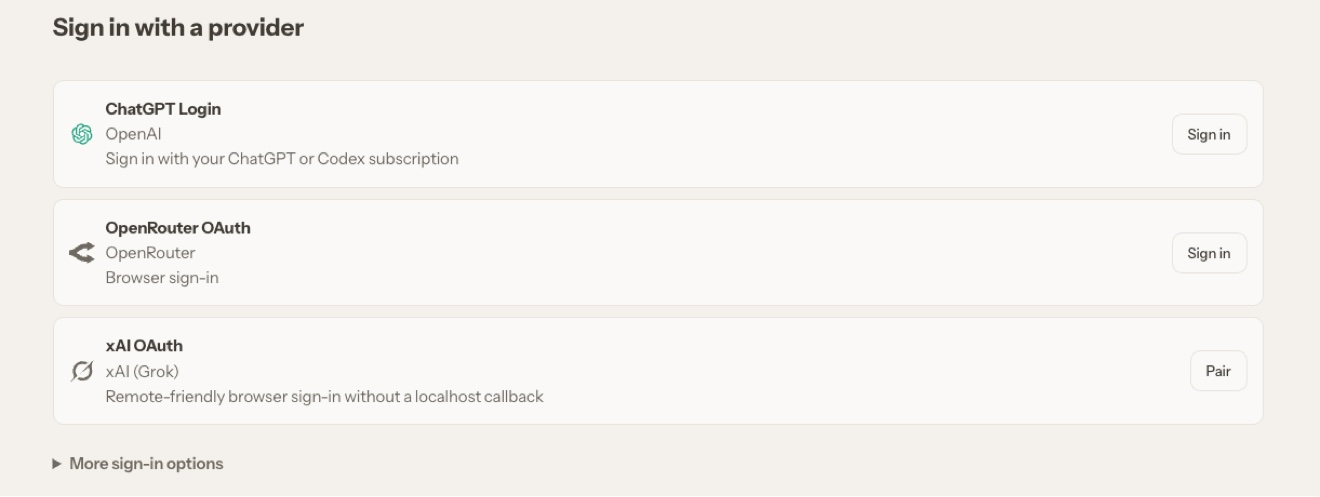
On your agent's URL, go to Settings, then Model setup. You see a "Sign in with a provider" screen with a list of login options.

-
Sign in with your ChatGPT subscription
Click the Sign in button on the ChatGPT Login card. A browser window opens. Sign in with your OpenAI account and approve the access.
That is the whole setup. There is nothing to copy, nothing to paste. If you ever need to reconnect, this is where you do it.
-
Prove it works
Send your agent a first message at its URL:
Verify
Which model are you running on? Reply with the model name, then summarize our conversation so far in one sentence to prove you can use it.When the answer comes back, the subscription connection is live. Every model call from here on rides on your ChatGPT plan, not a separate API bill.
API key vs subscription sign-in
| OpenAI API key | ChatGPT Login | |
|---|---|---|
| Billing | Metered, pay per token | Covered by the ChatGPT plan you already pay for |
| Setup | Paste a key from platform.openai.com | One click, browser sign-in |
| Pick it when | You run heavy volume outside any subscription | You already pay for ChatGPT every month |
The honest limits
The sign-in gives your agent model access under your subscription. It cannot touch your billing or OpenAI account settings.
Your plan's usage limits still apply. A busy agent can hit rate limits on lower tiers.
If the agent suddenly cannot reach the model, open your agent's URL, go to Settings, then Model setup, and sign in again.
Tip
Sign in only on your own agent's settings page. Never paste credentials or approve a "connect your ChatGPT" prompt from anywhere else.
What to do next
Create your agent, open its URL, and go to Settings, then Model setup. About two minutes, and from then on your agent runs on the subscription you were already paying for.